What the Red Dot on Your Apple Watch Means, and the Other Status Icons at the Top
When your iPhone is locked and your watch isn't, alerts go to your wrist, and the ones you don't read leave a red dot. This covers how to clear it, how to hide it, which icons explain a silent or unresponsive watch, which ones show how it's connected, and what Apple says every status icon means.
views
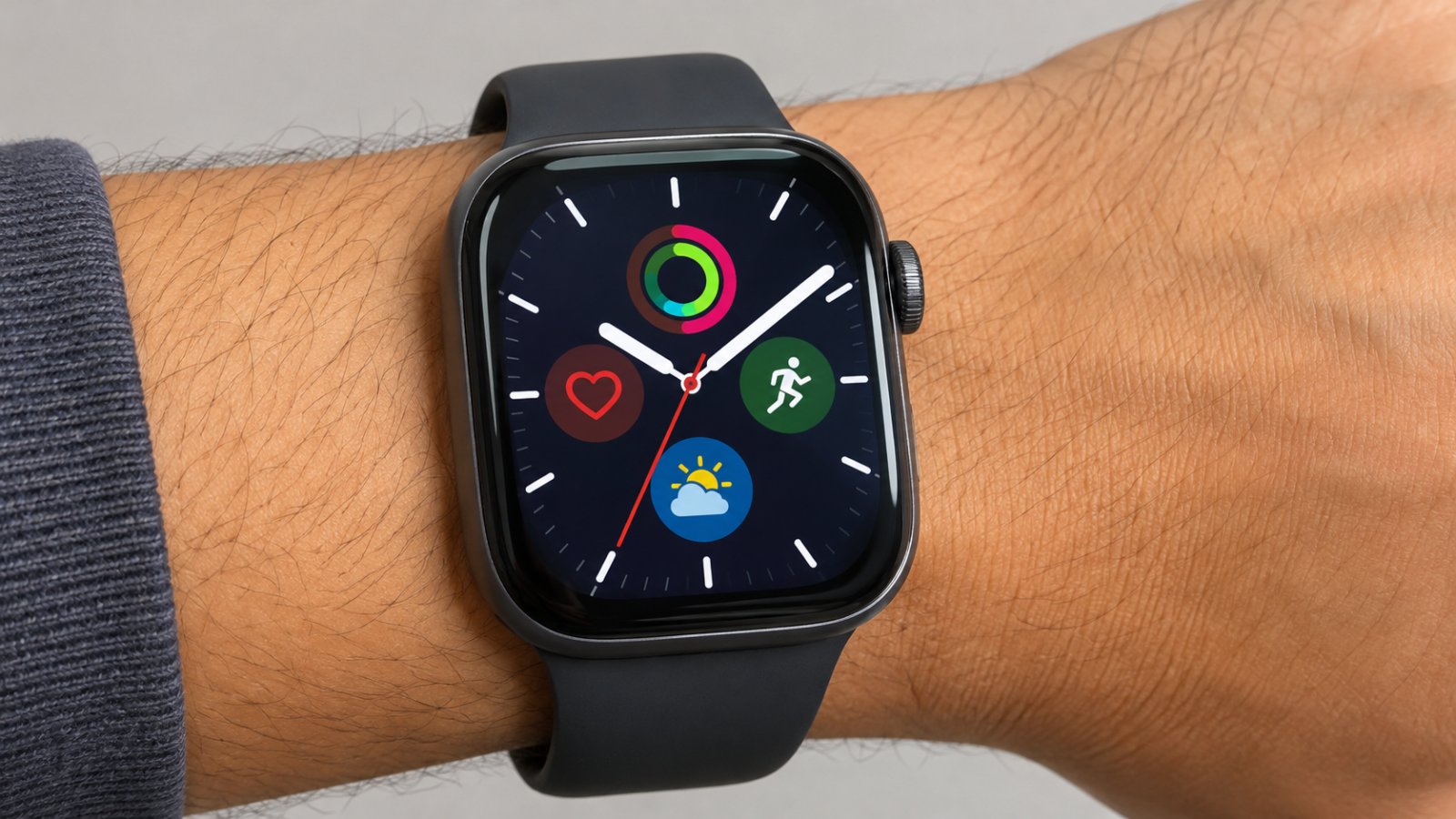
When your iPhone is locked and your Apple Watch isn't, the alerts go to your wrist. That's the routing Engadget describes: "If it is locked and your Watch is the one that's unlocked, it will send notifications to the wearable instead." The phone stays quiet and the watch takes the alert.
Whatever you don't read straight away is kept. Apple's notifications guide says: "If you don't read a notification when it arrives, it's saved in Notification Center. A red dot at the top of your watch face shows you have unread notifications."
So the dot points to that saved pile. Engadget describes it as notifications "you've yet to read and dismiss." Apple's status icon page has the short version: "Red dot: You've received a notification." The Apple Watch user guide adds what to do about it: "You have an unread notification. Swipe down on the watch face to read it."
Clearing it
Engadget gives two methods. For everything at once:
- Swipe down on the watch face to open Notification Center.
- Scroll to the top of the list.
- Tap Clear All.
For a single notification, swipe left on it and tap the X. Clear All takes fewer swipes.
Hiding the dot instead
If the dot bothers you more than the notifications do, there's a switch for it. Apple's Apple Watch guide gives the path: open the Watch app on your iPhone, go to Notifications, and turn off Notifications Indicator. The same setting is also on the watch, under Settings, then Notifications. According to Apple, hiding the indicator does not stop alerts. How-To Geek has its own walkthrough, How to hide the red dot on an Apple Watch.
So the dot goes and the alerts stay, and Apple's notifications guide says anything you don't read when it arrives is saved in Notification Center. You just lose the reminder to go and look.
If the dot keeps coming back, Engadget and Apple cover two fixes: clear the list, or hide the indicator. Instructions for limiting which apps send alerts to the watch, or for notification mirroring, were not available at the time of writing.
When the screen or the sound stops behaving
Some of Apple's icons mean a mode is switched on that changes how the watch responds. If something seems wrong, check the top of the screen first. Here they are by symptom, using the wording in Apple's user guide and status icon page:
- Screen ignores taps: the water drop means Water Lock is on. Apple says to press and hold the Digital Crown.
- Screen stays dark when you raise your wrist: the orange masks mean Theater Mode is on and the watch is silenced.
- Calls and alerts don't sound or light the screen: the crescent moon means Do Not Disturb is on.
- Watch asking for a passcode: the blue lock means it's locked. Tap it and enter your passcode.
The masks and the moon are easy to mix up. Theater Mode silences the watch and keeps the display dark when you raise your wrist. Do Not Disturb stops calls and alerts from sounding or lighting the screen, and the user guide says alarms are still in effect.
Steps for switching off Theater Mode, Do Not Disturb, Airplane Mode and Sleep mode were not available at the time of writing.
Which connection the watch is using
Four icons describe the watch's connection. If a message you expected hasn't arrived, look at these before anything else. Apple describes them like this:
- Green bars: connected to a cellular network. The number of green bars indicates signal strength.
- Blue Wi-Fi: connected to Wi-Fi instead of your iPhone.
- Red iPhone: not connected to your iPhone.
- Orange airplane: Airplane Mode is on. Wireless is turned off, but nonwireless features are still available.
After a flight, look for the orange airplane first.
Two more icons cover sleep and power rather than connection or sound: the purple bed for Sleep mode and the yellow circle for Low Power Mode. Apple's status icon page gives each a one-line meaning.
Green, orange, blue and the rest
What about green, orange and blue? On Apple's status icon page and in the user guide, the red dot is the only symbol called a dot. The green, orange and blue entries are shapes: bars, an airplane, masks, a lock, a Wi-Fi symbol. Engadget's piece only covers the red dot, so every row below comes from one of those two Apple pages, named in the last column.
| Symbol | What Apple says it means | Apple page |
|---|---|---|
| Red dot | You've received a notification. The guide adds that it's unread and you swipe down on the watch face to read it. | Status icon page; user guide |
| Red battery | Battery is low | Status icon page |
| Red iPhone | The watch is not connected to your iPhone | Status icon page |
| Green bars | Connected to a cellular network. The number of green bars indicates signal strength. | User guide |
| Orange airplane | Airplane Mode is on. Wireless is turned off, but nonwireless features are still available. | Status icon page; user guide |
| Orange masks | Theater Mode is on, along with Silent Mode. The watch is silenced and the display won't light up when you raise your wrist. | Status icon page; user guide |
| Blue lock | The watch is locked. Tap to enter the passcode and unlock. | User guide |
| Blue Wi-Fi | The watch is connected to Wi-Fi instead of your iPhone | Status icon page |
| Water drop | Water Lock is on and the screen doesn't respond to taps. Press and hold the Digital Crown to unlock. | User guide |
| Crescent moon | Do Not Disturb is on. Calls and alerts won't sound or light up the screen, but alarms are still in effect. | User guide |
| Purple bed | Sleep mode is on | Status icon page |
| Yellow circle | Low Power Mode is on | Status icon page |
Apart from the red dot, only two rows come with instructions on these pages: the lock (tap and enter your passcode) and the water drop (press and hold the Digital Crown). For the rest, Apple says what the icon means and stops there.
If you see red at the top, look at the shape before you worry. On the status icon page, the red dot is about notifications. The red battery and the red iPhone are the red symbols about the watch itself: the battery is low, or the watch has lost its connection to your iPhone.

Duarte Pinheiro
For seven years, the night desk of a small guesthouse in Porto was Duarte Pinheiro's job. He sorted out lost bookings, dead chargers and guests who couldn't get online. Now he writes about travel and the internet side of...
View profileMore from Duarte Pinheiro
View all →
Recommended for you
More stories →
Instagram Now Guesses Age Worldwide: What a Teen Flag Changes, What Is Known About Undoing It

RTX 5070 Ti vs RX 9070 XT vs 4080 Super: Which to Buy for a First PC Build
Slim Magsafe Battery Pack Under $50

Leave a Comment